

Nerdwallet’s budgeting app is part of a suite of tools available whenever you register for an account on their site. It’s a lesser-advertised benefit.
In addition to budgeting and monitoring your net worth, you can also get your credit score based on your TransUnion credit report. Not bad for a free app.
📔 Quick Summary: If you register an account on NerdWallet, you can get free access to their basic budgeting and net worth tracking tool as well as a free credit score based on your TransUnion credit report. It’s not a very complex tool but if you just want to keep an eye on your transactions, spending categories, and bills – it might be a good option for those who don’t want to pay. It is our favorite of the completely free budgeting apps.
At a Glance
- Free
- More of a financial tracker than a budgeting tool
- Mobile focused, limited web access
- Ad heavy
Who Should Use NerdWallet’s Budgeting App
If you are new to budgeting, or have tried more complicated budgeting apps and gotten frustrated, NerdWallet’s budgeting app might be a good fit. It’s not a budgeting app, as much as it is a spending tracker. This is perfect for those who aren’t great at keeping up with their budget and really just want to know how they spent their money in the past.
However, if you want a true budgeting app, where you can set categories and track your spending against your goals, then NerdWallet might not be for you.
NerdWallet Alternatives
 |
 |
 |
|
| Pricing | $9.08 per month or $109 annually | $10 per month or between $50 and $150 per year | $2.99 |
| Track net worth | Yes | Yes | Yes |
| Track credit score | No | No | Yes |
| Learn more | Learn more | Learn more |
Table of Contents
- At a Glance
- Who Should Use NerdWallet’s Budgeting App
- NerdWallet Alternatives
- Signing up for NerdWallet
- Cash Flow Tracking
- 50/30/20 Budget Tracker
- Net Worth Tracking
- NerdWallet Mobile App
- NerdWallet as a Budgeting Tool
- Is It Worth It?
- NerdWallet Budgeting App Alternatives
- Bottom Line
Signing up for NerdWallet
Once you register for an account, you’re prompted to finish two more steps:
- Pull your credit score
- Connect your first account
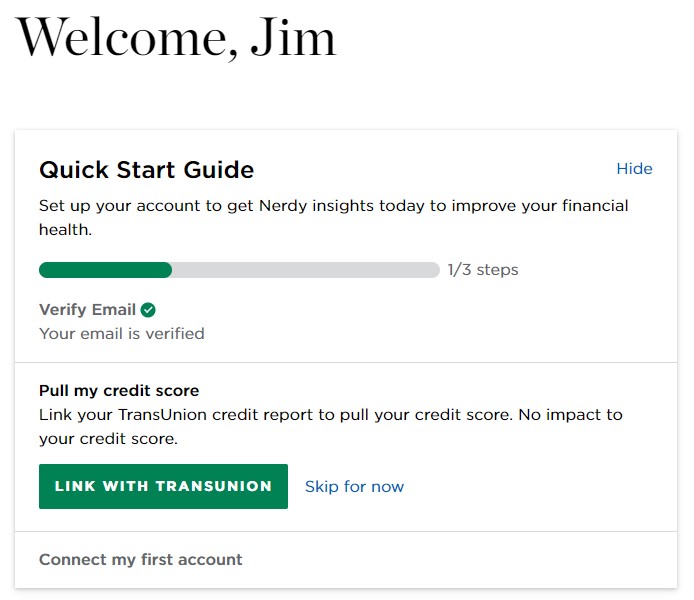
I don’t really care about my TransUnion credit score right now, but right below that image is “Your key numbers” and two intriguing boxes:
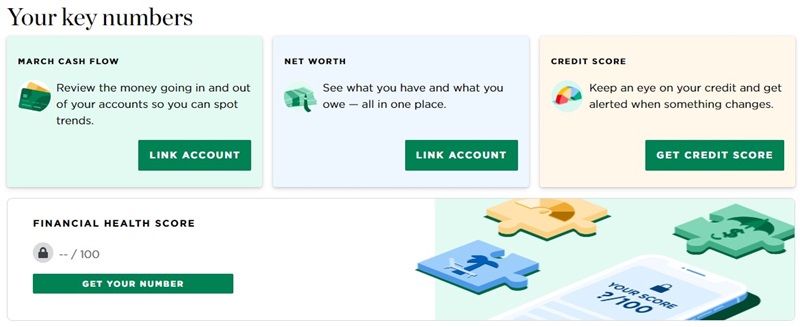
Before you can use any of those features, they want more information so they can increase their security. They ask one security question and then want you to verify your phone number. This is probably a requirement for Plaid, what they use to link your accounts, and you always want two-factor authentication for stuff like this.
Cash Flow Tracking
Using Plaid, I connected our Chase credit cards to see what kind of budgeting features they would offer. NerdWallet wants your account numbers (Chase gives them “substitutes” that aren’t your actual numbers), account names, balances, transactions, rewards, and contact information.
I offered up the main credit card we use, the Chase Sapphire Preferred card. Incidentally, if you have multiple logins to a single institution, you can only use one. For example, if you have a login for your bank and your partner does too (to a separate account), you can’t log into both accounts.
Those three boxes updated to show this:
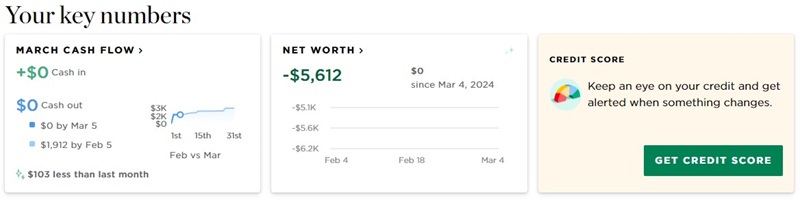
If you click through, you get the types of things you’d expect:
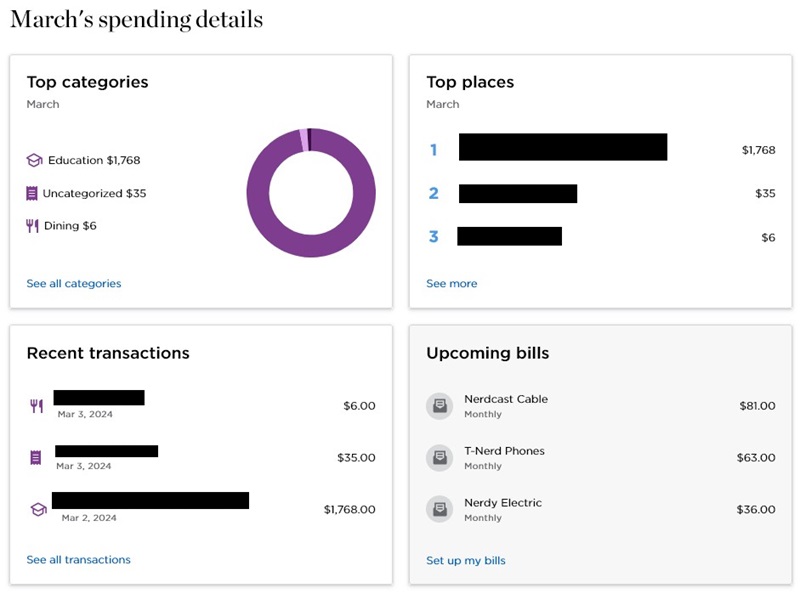
The interesting data is in the Recent Transactions:
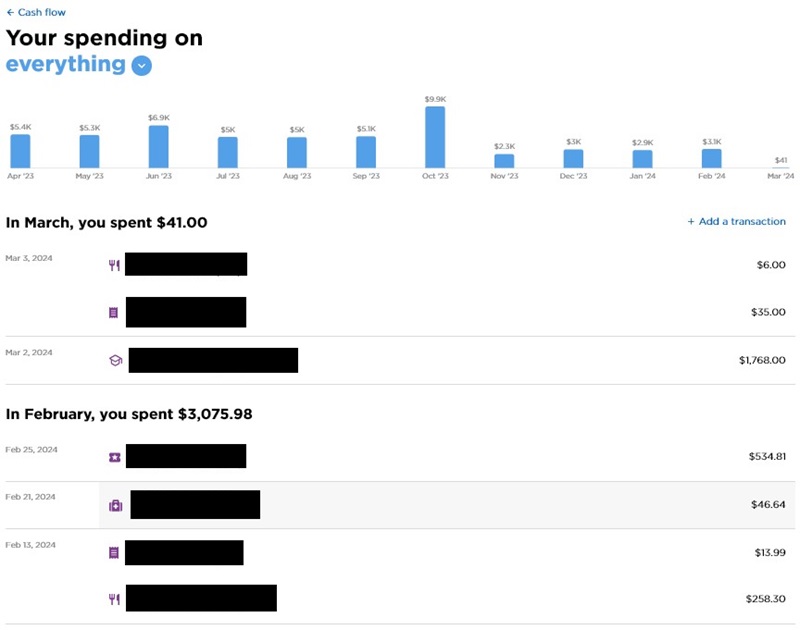
If you are using the mobile app, you can click on a transaction, you can edit a lot of the details. This can no longer be done on the website.
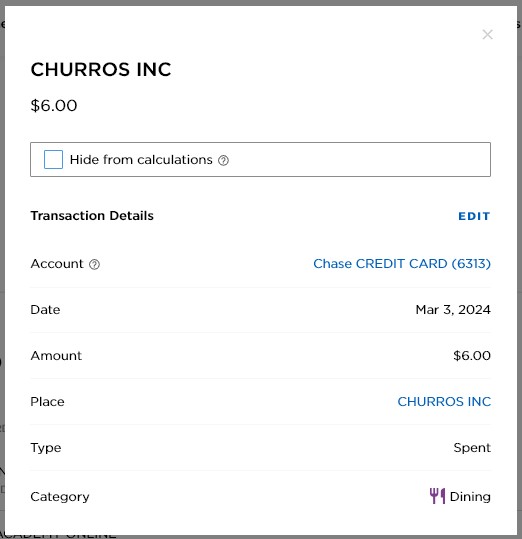
The budgeting features are relatively basic, with a few minor concerns.
You cannot split a transaction into multiple categories. You can edit the value lower and then add another transaction, which is a few extra steps.
If you got paid back for a shared expense, you can add a transaction for that, but there’s no way to link it to the original expense.
If you edit a transaction’s category, it doesn’t know to edit the other transactions from that same vendor to the new category. For the most part, it gets most of the categories right.
Depending on how particular you like your categories, they can be a little broad. And you can’t add custom categories. What you see is what you get.
Finally, you can’t manually add a transaction for the future, it’ll default to the current date.
Upcoming Bills
To use the upcoming bills feature, you have to add each bill yourself. NerdWallet will check for recurring charges and suggest ones that might be recurring but it always suggests that it’s a monthly cadence.
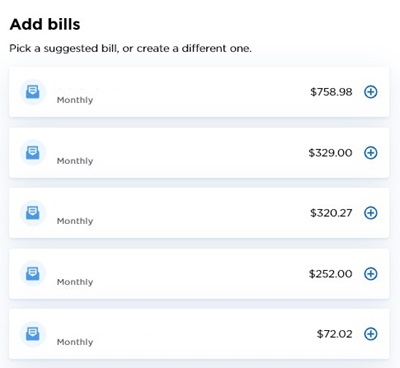
If you click the Plus sign, you can add it after editing the details. You can change the name, amount, next due date, frequency, bill category, and subcategory. For frequency, you can pick weekly, every other week, monthly, every other month, every 3 months, every 6 months, yearly, or one-time.
When you’re done, scroll down to the “Add X Bills” button to save it. If you X out the window, it won’t save.
50/30/20 Budget Tracker
Do you follow the 50/30/20 budget? That’s where you spend 50% on needs, 30% on wants, and 20% on savings and debt repayment?
If so, that’s built into the mobile app. You can get a report each month to see how close you matched those percentages.
It’s still in beta but eventually they will let you move things around the columns:
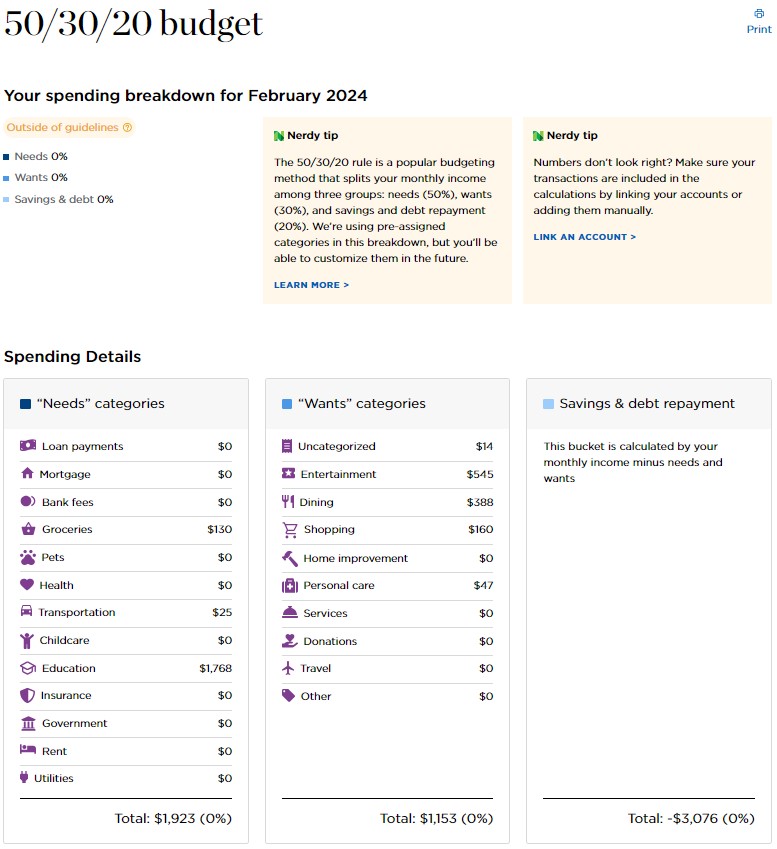
The only philosophical gripe you can have with this is that the principle behind the 50-30-20 budget is that you set aside 20% for savings and debt repayment first.
They calculate it as what is left over after all the other expenses. This is because savings and debt repayment aren’t linked to specific transaction categories. This could be fixed if they made a special category for it, so that you could “pay yourself first.”
Net Worth Tracking
Since I was mostly interested in the budgeting features, I didn’t go through the effort of adding any investment accounts so the Net Worth page looks barren:
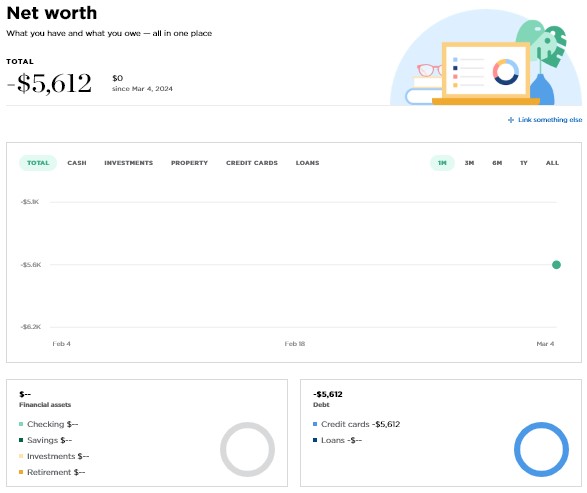
I suspect this part of the tool isn’t going to be super sophisticated and even after adding a few manual accounts, with dummy information, what you see is what you get. It collects data and tracks it, similar to what you might get from Empower Personal Dashboard, but not much in the way of breakdowns and analysis beyond what categorization.
They may expand this later but right now it’s rudimentary.
NerdWallet Mobile App
NerdWallet is moving this tool to the mobile app and reducing the features available on the website.
The app is a convenient way to access your account from your phone, without having to go to the website to do it. The only major difference is the addition of a Marketplace, which is where you can find different products (and sign up for NerdWallet+)
Having the app also gives you the option to opt into push notifications.
You can get push notifications for cash flow – such as “spending updates for large transactions, fees, deposits, and more.” I couldn’t find a way to set up notifications
NerdWallet as a Budgeting Tool
NerdWallet’s budgeting tool isn’t so much a budgeting tool as it is a spending tracker. If you just want to pull reports and see how you spent your money in the past, then NerdWallet will be useful.
However, if you want to plan your spending ahead of time, you’ll find this tool lacking. You can’t create categories and plan spending like you can in most other budgeting apps. For example, you can’t set a “Restaurant” category and then track your spending against it, so you only spend what you have budgeted.
Is It Worth It?
Considering it’s free, they do offer a lot of the basic features you were getting with Mint (but you cannot import transactions).
The inability to split transactions is one big difference but there’s also no way to force a sync of your accounts. They are going to be synched once a day at whatever cadence NerdWallet has worked out with Plaid. I suspect this is to help keep costs low, which is completely reasonable.
If you look at reviews online, you’ll hear that some people have had difficulty linking up different accounts, but that’s likely a Plaid issue and not a NerdWallet one. If you’ve had issues with Plaid and your institutions in the past, you’ll have those same issues here.
NerdWallet Budgeting App Alternatives
YNAB
YNAB is a true budgeting app with a huge following. With YNAB, you create categories and fund those categories as income arrives. You’ll then track your spending against the categories so you always know where you stand.
It works on the principle of “living on last month’s income” and helps you get there by encouraging you to fund next month’s categories when possible, thus breaking the paycheck-to-paycheck cycle.
Here’s our full YNAB review for more information.
Lunch Money
Lunch Money is another true budgeting app. You can set up categories in your budget and indicate how much you’ll spend in each category. As transactions come in, you’ll categorize them and you can see exactly how much you’ve spent so far in each category and compare it to your goals.
It’s claim to fame is that it can easily handle multiple currencies. So if you travel frequently, or get paid in a different currency than you spend in, this app can handle that with no issues.
Here’s our full Lunch Money review for more information.
Simplifi
Simplifi is Quicken’s budgeting app. It’s simpler than either YNAB or Lunch Money, but provides more budgeting features than NerdWallet’s. So if you want something with more features than NerdWallet offers, but